Introduction: Major Differences Between APK XAPK and OBB Files
For new Android users, installing apps outside the official Google Play Store can be confusing due to the variety of file formats involved. The standard .apk is simple enough, but the appearance of .xapk and separate .obb files often leads to an Android app file types explained search.
Importance of Understanding APK, XAPK, and OBB Formats
Understanding the differences between Android app file formats is crucial for successful manual installation (sideloading APKs, XAPKs, or OBBs). Knowing what each file does helps you avoid frustrating “App Not Installed” errors and manage storage effectively.
How File Types Affect Installation, Storage, and Game Performance
- Installation: Certain files (XAPK) require specific installers.
- Storage: OBB files are large and consume significant storage space.
- Performance: Correct OBB placement is essential for high-end games to run smoothly.
What Are APK, XAPK, and OBB Files?
Basic Overview of Each File Format
| APK | Android Package Kit | The standard installer package for the core app program. |
| OBB | Opaque Binary Blob | An expansion file containing large, non-executable data (like game assets). |
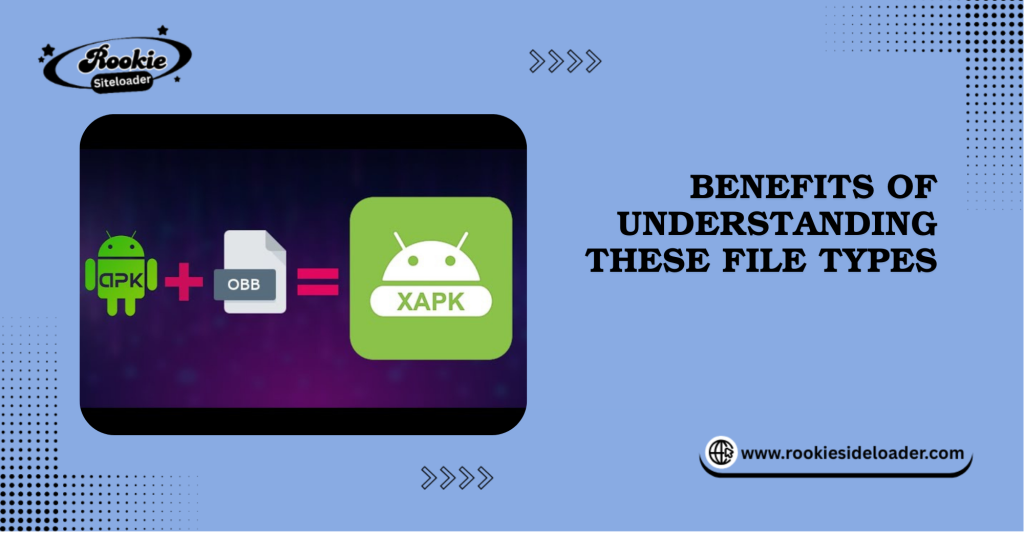
| XAPK | Cross-Platform APK Bundle | A container that bundles the APK and its required OBB file(s) together. |
Key Purpose of These Files in Android App Installation
The primary purpose of all these files is to serve as the deployable package that the Android operating system (OS) uses to install an application. The core function is to provide the Android Package Manager (the system installer) with the complete set of instructions and resources needed to verify integrity, install code, define permissions, and set up the app’s secure sandbox.
Why Some Apps Need Extra Files to Run Smoothly
Google Play Protect introduced the OBB format to handle apps larger than its previous file-size limit (currently 100MB). When a large game (e.g., 2GB) is downloaded, the Play Store downloads the small APK first, followed by the large OBB file. When you manually sideload an APK, XAPK, or OBB, you must replicate this process.
How APK, XAPK, and OBB Files Differ (Beginner-Friendly Breakdown)
APK Files Explained
- What an APK contains: the core application code, resources (such as icons and layouts), and the manifest file (which specifies the permissions the app needs).
- When and how APKs are used: Used for nearly all Android apps, they are the basic, necessary installation file. Used alone for smaller apps.
OBB Files Explained
- What data OBB files store: Large media assets, high-resolution textures, audio tracks, complex databases, and other non-executable resources. The OBB file usage on Android is vital for high-end games.
- Why many high-end games require OBB files: To keep the primary APK file size small for quick downloads while housing the bulk of the game data separately. The operating system uses the OBB file at runtime.
XAPK Files Explained
- Why XAPK includes both APK + OBB: XAPK is a custom package format used by third-party app stores (like APKPure) to simplify installation. It guarantees that the user downloads both the core program and the large data file in a single shot.
- Benefits of using XAPK for large apps: Simplifies the process; the dedicated XAPK installer handles the difficult file placement, which is a major part of the XAPK installation guide.
Side-by-Side Comparison: APK vs XAPK vs OBB
| Size | Usually small (under 100 MB) | Large (often 500 MB to several GB) | Large (Size of APK + OBB) |
| Executable? | Yes (Core installer) | No (Data only) | No (Container) |
| Installation Method | Standard tap-to-install | Requires manual placement in a specific folder | Requires special installer/extractor |
How to Install APK, XAPK, and OBB Files Properly
Installing an APK File (The Standard Method)
- Download the APK file from a trusted source.
- Tap the downloaded file.
- The system will prompt you to enable permissions (“Allow from this source”) for the app (e.g., your browser or file manager) initiating the install.
- Tap Install.
Installing an XAPK File (Requires a Dedicated Tool)
If you need a simple XAPK installation guide to install APK XAPK OBB, this is the easiest part.
- Download a dedicated XAPK installer tool (such as APKPure App or XAPK Installer).
- Install the XAPK installer.
- Open the installer and locate the XAPK file.
- The installer will automatically unpack the XAPK, placing the APK in the correct installation directory and the OBB file in the correct data folder.
Installing an OBB File (The Manual Method)
This is the most critical step for the OBB file on Android. The game will not run without the correct placement.
- Install the core APK first. (Do not open the app yet!)
- Locate the OBB file you downloaded (it will look like main.[version number].[package name].obb).
- Use a file manager (like Files by Google) to navigate to the internal storage path:
- Android/obb/
- Create a new folder inside the obb directory. The folder name must exactly match the app’s package name (e.g., com.gamename.android).
- Move the OBB file into this newly created folder.
- You can now open the game/app.
Safety Tips for Manual Installations
Always verify file security using a multi-engine scanner (like VirusTotal) before installing APK, XAPK, or OBB files. Only download from trusted sources (like APKMirror) to avoid harmful or fake files.
Benefits of Understanding These File Types
Understanding the Android file types explained here gives beginners confidence:
- Helps Avoid Installation Errors: You know the difference between an installation failure (a corrupted APK) and a data-loading failure (an incorrect OBB placement).
- Allows Access to Large Games and Premium Apps: You can manually manage files that are otherwise too large or complex for standard direct installation.
- Better Control Over Storage and Game Data: You know exactly where the large OBB files are, allowing you to manage space efficiently.
- Makes Troubleshooting Easier for Beginners: When the game crashes, you know to check the Android/obb/ folder first.
Precautions and Best Practices
- Always Download Files from Trusted Sources: This is the single most important rule for sideloading APKs, XAPKs, and OBBs.
- Check File Compatibility: Ensure the APK/OBB version is compatible with your Android OS version.
- Use a File Manager App: Utilize a reliable file manager for organized installation and accurate OBB file placement.
- Avoid Editing or Deleting OBB Files: Never modify the OBB file name or content, or the game will fail to load its resources.
Conclusion
The APK is the app’s brain, the OBB is its media library, and the XAPK is the tidy suitcase that bundles them together, simplifying the process of installing large games on Android.
Final Tips for Safe and Easy Installation
For simple installations, stick to pure APKs. For large games from third-party sites, use a dedicated XAPK installer. And always keep your security permissions tight.
Encouragement for Beginners to Explore Android File Formats Confidently
Don’t let these file types intimidate you. Understanding the basic role of the APK, XAPK, and OBB gives you control, allowing you to confidently manage your Android app file formats and enjoy high-end mobile gaming.
Frequently Asked Questions (SEO Optimized)
What is the main difference between APK and XAPK?
An APK is the single-core application installer, whereas an XAPK is a container that bundles the APK together with its required OBB data files for easier downloading. This is the primary difference between Android app files.
Why do some games require OBB files?
Games require OBB files to store large resources (textures, audio) that exceed the size limit of the core APK file (100MB on the Play Store). This is key to using OBB files on Android.
Is it safe to install XAPK files?
Yes, if they are from a trusted, verified source. The XAPK format itself is safe; the risk comes from downloading them from unverified websites.
How do I open an XAPK file without errors?
Use a dedicated XAPK installation guide tool (like APKPure App or XAPK Installer). This tool automatically extracts and places the APK and OBB files correctly, preventing manual errors.
Can I install games without the OBB file?
Yes, you can install the APK, but the game will likely fail to launch or crash at startup because it cannot find the required resources in the OBB file.
Why does my OBB file not load after installation?
The most common reason is incorrect folder placement. Ensure the OBB file is placed inside a subfolder under Android/obb/ and that the subfolder name exactly matches the app’s package name.
Are APK and XAPK files legal to install?
Yes, if they are free and legally distributed. Pirated or cracked versions of paid apps are illegal, regardless of whether they are packaged as APK or XAPK.
Do all large games come with OBB files?
Most high-end games exceeding 100MB use OBB files (or the newer Split APK system) for distributing large assets.
Latest Post: